Monitoring
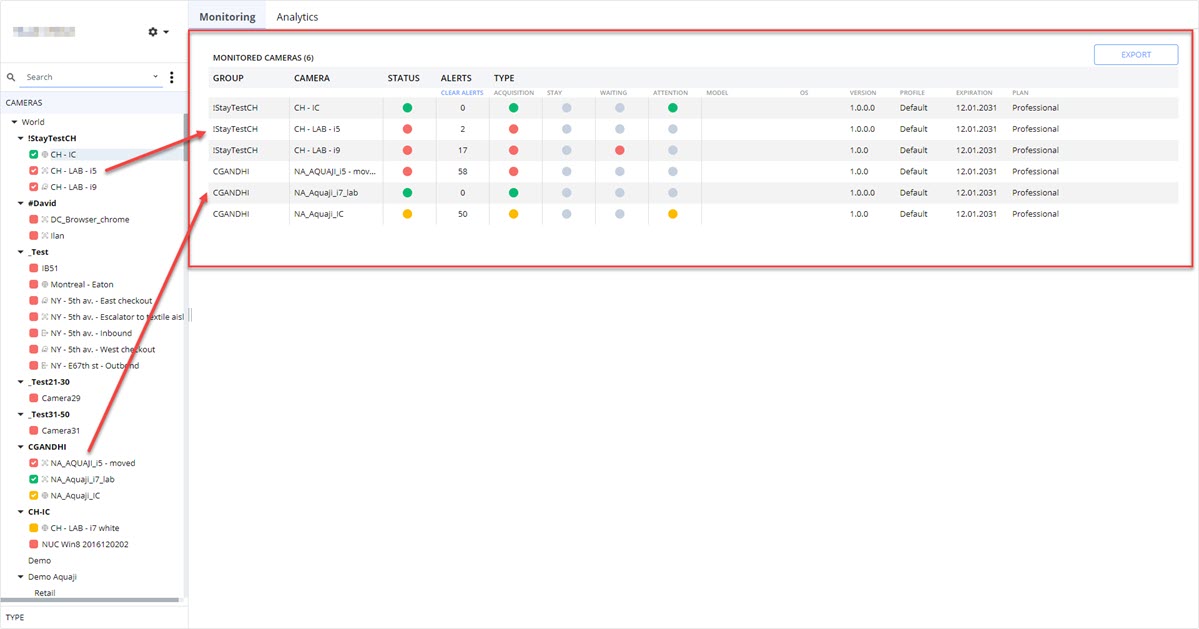
The Monitoring window shows a table populated with the edge players selected in the CAMERAS or TYPE view.
IMPORTANT!
You must select edge players in the CAMERAS or TYPE lists to show data in the Monitoring window. Only selected edge players will be shown in the table.
The table displays the following information:
- GROUP name: The name of the group to which the edge player is assigned.
- CAMERA name: The name assigned to the edge player.
- STATUS: The status indicator color that corresponds with the state of the edge player device. Clicking this indicator opens the Alert window.
- ALERT: The number of recorded alerts.
- TYPE: The status of the camera based on the type of acquisition assigned to the edge player. This regroups the Acquisition, Stay, Waiting and Attention acquisition types. Color indicates the status of the device as per its acquisition type and since some edge player cameras can perform multiple types of acquisitions, you may see more than one status color.
- MODEL: The edge player device's model name.
- OS: The operating system installed on the edge player.
- VERSION: The Aquaji edge player software version installed on the edge player.
- PROFILE: The edge player's assigned Technical Profile.
- EXPIRATION: The Aquaji edge player software license's expiry date.
- PLAN: The Aquaji edge player software plan in effect.