Edge player status indicator
Status indicators are found in the CAMERA/TYPE windows and in the monitoring STATUS and TYPE sections.
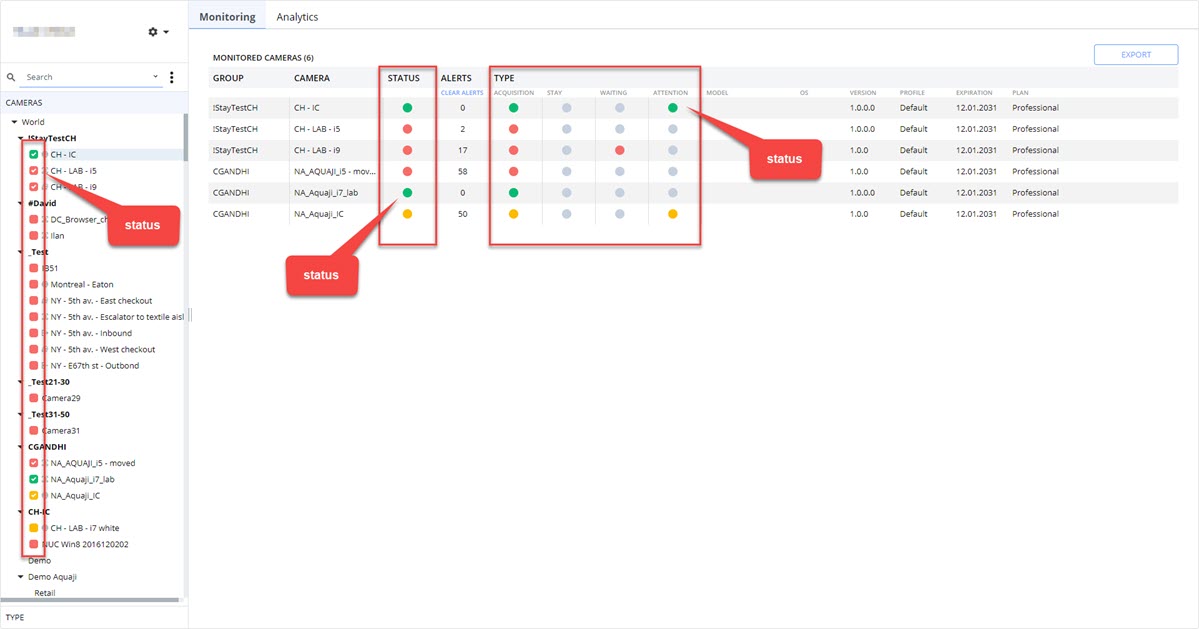
Status indicator color meanings
- GREY: Not activated or not applicable.
- Grey status in the CAMERAS and TYPE windows indicate an edge player license has not been activated and the device has not yet connected to the server.
- Grey status in the Monitoring table's TYPE section indicate this use is not supported.
- RED: A red status indicates the edge player is turned off or offline. Aquaji server is not receiving a heartbeat signal from the device, or the camera is offline.
- YELLOW: A yellow status indicates the edge player has recorded an alert and the user should investigate by clicking the yellow status indicator in the Monitoring/STATUS column.
This will open the ALERTS and EVENTS window. - GREEN: A green status indicates the edge player and camera are online and operating normally. There are no alerts to resolve.